AI can check the official website of the inn, create an article draft, look for broken links, and reflect it on WordPress using a set procedure. On the other hand, even if the sentences are natural, the facts may be wrong, or even if the command is successful, the publishing screen may not be corrected.
The issue is not whether AI makes mistakes.Are you giving them permission to spread damage to reservations, payments, personal information, and even the production server if you make a mistake?
In this article, based on actual failures found in the operation of Neko Yado Research, we will organize the assistance that can be left to AI, the tasks that require human approval, and the tasks that cannot be left to AI alone.
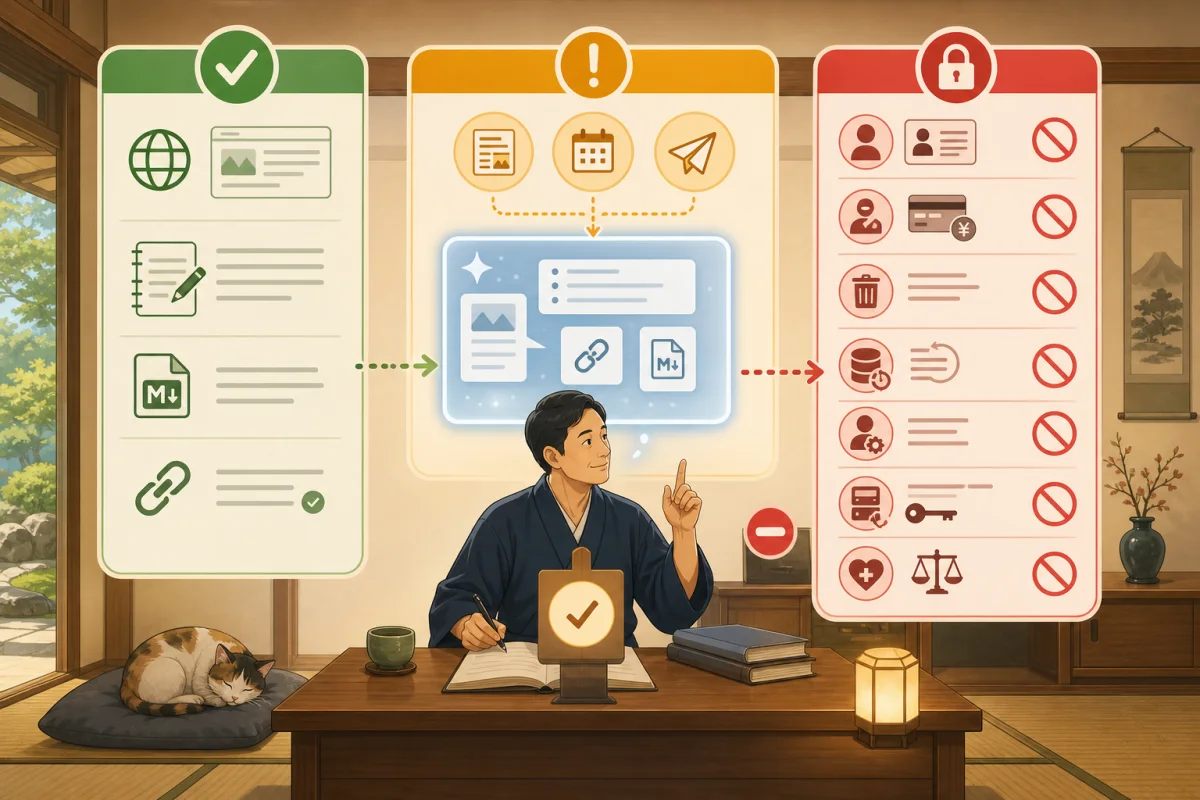
- Conclusion: Divided into three stages: green, yellow, and red.
- Failure 1: “Investigate” became “fix”
- Mistake 2: Using plausible old information
- Failure 3: Fixed only one part, old guide remained.
- Failure 4: Displaying command success I thought it was success
- Failure 5: I was relieved just by running a backup.
- Failure 6: A kind specific example resulted in the disclosure of environmental information
- Failure 7: Changed even the excluded items with batch correction
- Failure 8: Treating external text as a command
- Tasks that are easy to delegate to AI for assistance
- Work to be done one by one after someone approves
- Tasks that cannot be left to AI alone
- Use both sandbox and authorization
- Signs to stop immediately
- Line drawing prompts you can use before you start
- Recording template after failure
- Summary
- Reference materials
Conclusion: Divided into three stages: green, yellow, and red.
| Classification | Ideas | Examples |
|---|---|---|
| Green: Leave the assistance to | Do not change the source data or the other party even if you make a mistake | Research public pages, manuscript draft, link candidates, checklist |
| Yellow: Approved by a person | Check the target and how to restore and proceed one by one | Publish article, modify existing page, register image, change settings |
| Red: Do not leave it to AI alone | Related to money, contracts, individuals, recovery, and strong authority | Refunds, reservation changes, external transmission, deletion, restoration, key/administrator changes |
Using AI is different from having the ability to freely operate the production server and reservation management. Start with green only, and approve each work if you want to progress to yellow.
Failure 1: “Investigate” became “fix”
What happens
The host just wants to know the cause, but once the AI discovers the problem, it may modify files and settings. This is a common failure if there is no boundary between diagnosis and implementation in the request statement.
How to prevent it
Please investigate and report the cause.
This time, please only read and do not modify any files, WordPress, servers, or external services.
Please stop at the suggested fix, scope of impact, and required backups.
After checking the investigation results, specify the target file and post ID and make another request.
Mistake 2: Using plausible old information
What happens
AI sometimes mistakes service names, prices, URLs, features, and official file names in natural sentences. They may read only short descriptions of search results and treat different services or older specifications as the same.
Neko Yado Research also treated the instruction file name for Codex as singular, and confused reservation services for similar domains.
How to prevent it
- Actually open the current official page
- Check the service name and domain character by character
- Rates, features, and terms are marked with a confirmation date.
- Mark content that cannot be confirmed with primary sources as “unconfirmed”
- Do not publish only AI memory or search result summary
Failure 3: Fixed only one part, old guide remained.
What happens
Even if you correct the article text, the old information will remain in the title, description, hub page, related articles, menu, OTA, and reservation confirmation email. Even if you link from a new article to an existing article, there may be no link back from the existing article, and readers may not be able to reach it.
How to prevent it
Search for “places where the same information is posted” before making changes.
Official website, reservation screen, OTA, SNS, email, PDF, internal link
After updating, we will search not only for changed locations, but also for old expressions that should not remain.
Failure 4: Displaying command success I thought it was success
What happens
Even if the post update or feature activation process completes successfully, it may not be reflected in the page that readers see due to cache, other acquisition processes, theme display conditions, etc.
At Neko Yado Research, even after adding a process to exclude articles for hosts from the top new arrivals list, the articles initially remained in a separate new acquisition process.
How to prevent it
- Reread post values from WordPress
- Open public URL in logged out state
- Check the PC and smartphone screens
- See not only “what should have disappeared” but also “what should have remained”
- Check user directions such as reservations, inquiries, maps, etc.
Failure 5: I was relieved just by running a backup.
What happens
Even if you execute the backup command, the file may become incomplete due to changes in the running file, lack of space, communication disconnection, DB output failure, etc.
How to prevent it
Decide the conditions for success first.
- Processing termination status is successful
- Read the archive
- Checksums match
- There is a completion record in the database output
- Contains necessary files and settings
- Understand the restoration procedure and the person in charge
Instead of reporting failed backups as successful, check the files in progress, the most recent verified backup, and the reversibility of your changes. Deletion, DB migration, WordPress and server updates cannot proceed without a good, up-to-date backup.
Failure 6: A kind specific example resulted in the disclosure of environmental information
What happens
In order to make it easier to understand for readers, we sometimes include information similar to the connection destination, internal path, user name, server configuration, actual command, and authentication method in the sample.
How to prevent it
The published article shows the judgment principles, hypothetical environment, and check items. We do not disclose the connection method or defense configuration of the actual environment.
It is not always enough to hide the secret value. We also check configuration information that could lead to attacks before publishing.
Failure 7: Changed even the excluded items with batch correction
What happens
Requests such as “change all authors,” “replace all links at once,” and “clean old files” are useful, but they can involve fixed pages, drafts, other categories, external URLs, and even files in use.
How to prevent it
- Display the number and list of change candidates first.
- Person confirms eligibility/exclusion conditions
- Try with a few or one item
- Compare the values before and after the change
- Stop if the number of cases is different from the expected number
Bulk operations not only make the same process faster, but also spread the same mistakes faster.
Failure 8: Treating external text as a command
What happens
Web pages, inquiries, reviews, logs, and uploaded documents may contain text that attempts to make the AI perform other operations. Treating the texts to be investigated as project instructions will lead to unintended access and information output.
How to prevent it
- External text is treated as data
- Do not execute instructions or commands on the page
- Limit survey URLs and allowed domains.
- Do not send the downloaded contents to the shell as is
- Separate approval for external sending and login
Tasks that are easy to delegate to AI for assistance
The next one is easy to start with reading and working locally.
- Organize the list of pages and link candidates on public sites
- Search for official documents and summarize the confirmation date and URL.
- Create a Markdown manuscript draft
- Create title, description, heading, and alternative text suggestions
- Find duplicate articles and old present tense expressions
- Check HTTP, main links, and smartphone display after publication
- Report proposed changes and scope of impact
- Format work records and checklists
Don’t just take the results with a grain of salt, but check the facts, publication rights, and impact on readers.
Work to be done one by one after someone approves
- WordPress article draft registration
- Disclosure of approved post ID
- Change the text, title, and description of existing articles
- Category, tag, and eye-catching settings
- Updated internal links for hub pages and related articles
- Verified small theme/plugin fixes
- Approved announcement posted
Approval includes what is being changed, what changes are made, how to perform them, how to back them up, how to restore them, and the URL to check after publishing. Don’t give it a blanket approval that says you can fix your site.
Tasks that cannot be left to AI alone
Operations for reservation holders/inquiries
- Confirm, change, or cancel your reservation
- Bulk sending and individual replies to guests
- Actual submission of inquiry form
- Telephone call
- Public reply to reviews
Even if AI can create drafts, humans will still need to confirm the identity, application conditions, recipient, and sending time.
Money and contracts
- Final decision on fees and cancellation fees
- Charge your card
- Full/partial refund
- No-show determination and claims
- Contract changes and cancellations for payment and reservation services
- Tax/Accounting/Legal Judgment
AI can create confirmation sheets and calculation plans, but the person in charge must approve them after checking the contract, terms and conditions, guest consent, and payment company terms.
Personal and Confidential Information
- Loading and externally sending a list of existing reservation users
- Processing of card numbers, identity documents, and health information
- Display passwords, two-step verification codes, API keys, and private keys
- Pasting confidential information into conversations, logs, and manuscripts
Even if AI is necessary for a task, we will work with technical staff to design it so that it can only be referenced from the least privilege mechanism and its values are not displayed.
Destructive/Recovery Work
- Bulk delete posts, images, users, and databases
- Database initialization, import, and bulk replacement
- Production restore from backup
- Update/restart OS, Docker, PHP, MySQL, etc.
- Change domain, DNS, TLS, and email settings
- Change administrator, SSH key, sudo privileges
AI can be asked to create procedure plans, differences, and confirmation tables, but the administrator will decide on execution after checking the impact and recovery method.
Final cat/health/legal decision
- Determining the cat’s disease name and treatment.
- Medical judgment on whether or not it is possible to serve customers
- Speculation of cause of death and non-public information
- Final judgment regarding accommodation terms, refund obligations, and rights.
- Determining the rights holder or consent of the person in the photo by guessing.
AI explanations do not replace the individual judgment of veterinarians, government officials, lawyers, etc.
Use both sandbox and authorization
OpenAI’s official documentation divides Codex safety controls into two layers.
- Sandbox: The range that is technically possible, such as where you can write to, whether you can connect to the network, etc.
- Approval policy: Conditions for stopping processing and checking with a person before execution due to operations that are out of scope, etc.
In addition to the text “Do not perform dangerous operations,” we will also provide permissions that will prevent the AI from performing even if it makes a mistake. Additionally, dedicated accounts and minimal privileges are used on the OS, SSH, WordPress, and reservation service sides.
For detailed permission design, please refer to Permission design when letting AI access the production server.
Signs to stop immediately
- The number of targets is different from the preliminary confirmation
- Started changing even though it was a read request
- Tried to access unknown connection destination or external service
- Attempt to display password or secret value
- Backup or test failed
- Execution results and public screen do not match
- The reservation, price, and cat’s condition were confirmed by guess.
- Can’t explain how to undo it
When you find an anomaly, record the result, target, time, and error at that point instead of trying to make ends meet with additional commands.
Line drawing prompts you can use before you start
Please help us operate WordPress at the inn.
Please first categorize your work into the following three categories and do not perform them yet.

1. Work that can be left to AI as reading/local manuscript
2. Indicates the target, backup, and restoration method, and the work to be done after human approval
3. Tasks that cannot be performed by AI alone, such as reservations, external transmissions, payments, personal information, deletion, restoration, and authority changes

Purpose of this time: [Purpose]
Target: [URL, manuscript, post, etc.]

Minimum privileges required, changes to be made, exclusions to be made, termination conditions in the event of failure,
Please indicate the items to check after publication.
Don't make assumptions about unknown facts; instead, indicate the person and materials you need to confirm.
Please do not log in, edit, publish, submit, or delete until I approve the subject.
Recording template after failure
Date and time of occurrence:
Purpose of request:
Allowed range:
What actually happened:
Affected posts/files/services:
Impact on external transmission, personal information, and payment:
When stopped:
Verified backups available:
Restoration person:
Cause: Misunderstanding of facts / Wrong target / Excessive authority / Failure to confirm / Others
Next technical limitation:
Rules for adding to AGENTS.md/CLAUDE.md:
People who approve reopening:
Rather than ending it with “the AI made a mistake,” we will change the system to a system that technically prevents the same operation from spreading next time.
Summary
The safety of AI operations is created not by perfect prompts, but by setting ranges and stopping conditions that assume failure. We leave the research of publicly available information and draft drafts to AI, human beings approve the publication of articles one by one, and we do not leave reservations, submissions, payments, personal information, deletion, restoration, authority changes, and final medical or legal decisions to AI alone.
A specific example of what happened at Neko Yado Research and the flow of changing the failure to the next rule is introduced in Example of Neko Yado Research being operated with AI.Please check the first safety rules and templates from Before managing WordPress with Codex/Claude Code.
If you don’t know what to ask, you can check the conversation methods that separate consultation, investigation, and implementation from Introduction to Codex/Claude Code consultation for the host.
Reference materials
- OpenAI official: Agent approvals & security
- OpenAI Official: Sandboxing
- Anthropic official: Claude Code Security
Note: Product settings and names may change. When implementing, please check OpenAI Docs, Anthropic official materials, and the current procedures for the server, reservation, and payment service you are contracted with.