At Neko Yado Research, we use AI and WP-CLI to create article manuscripts, register them with WordPress, update internal links, and confirm post-publishing. However, this does not mean that we are entrusting AI with the task of looking after the site.
In actual operation, we realized errors in the assumptions during the request, things were not reflected on the screen even though we had implemented them, and pre-publication backups did not complete normally. Each time, I stop my work, check it, and reflect it in the next rules.
In this article, we will introduce an example that occurred at Neko Yado Research as a judgment method that can be used at other inns. We do not post environment information that could be a clue to an attack, such as server connection destination, internal path, user name, authentication method, or actual command wrapper.
- What is left to AI is not “judgment” but “work assistance”
- Actual basic flow
- Example: Proceeding one article from consultation to publication
- Don’t let WordPress be the only memory of the AI
- Don’t put the original only on WordPress
- Case 1: I fixed the wrong file name on my own site.
- Case 2: Changed ZIP distribution to Markdown direct link
- Case 3: Deleting environmental information from public samples that are too specific
- Case 4: Excluding new arrivals on the top page did not work at first
- Case 5: The article was published, but there were insufficient internal links.
- Case 6: When the backup failed, we did not mark it as successful.
- Don’t leave everything to one request.
- WP-CLI is not allowed to run freely
- Items required for AI completion report
- Turn failure into a rule for next time
- If the host starts small
- Summary
- Reference materials
What is left to AI is not “judgment” but “work assistance”
AI is good at investigating multiple files, drafting sentences, organizing change candidates, executing set steps, and comparing confirmation results. On the other hand, the next decision is left to people.
- What to convey on your website
- Who is this article aimed at?
- What information can be made public?
- How to distinguish between actual experience and research information
- Which changes should be reflected in production?
- Is it possible to continue in case of backup failure?
- Is there any disadvantage to guests, resident cats, and related parties?
If this division is ambiguous, even if the AI cleans up the text, the article may not reflect the actual situation at the inn, or it may end up being used in a dangerous manner.
Actual basic flow
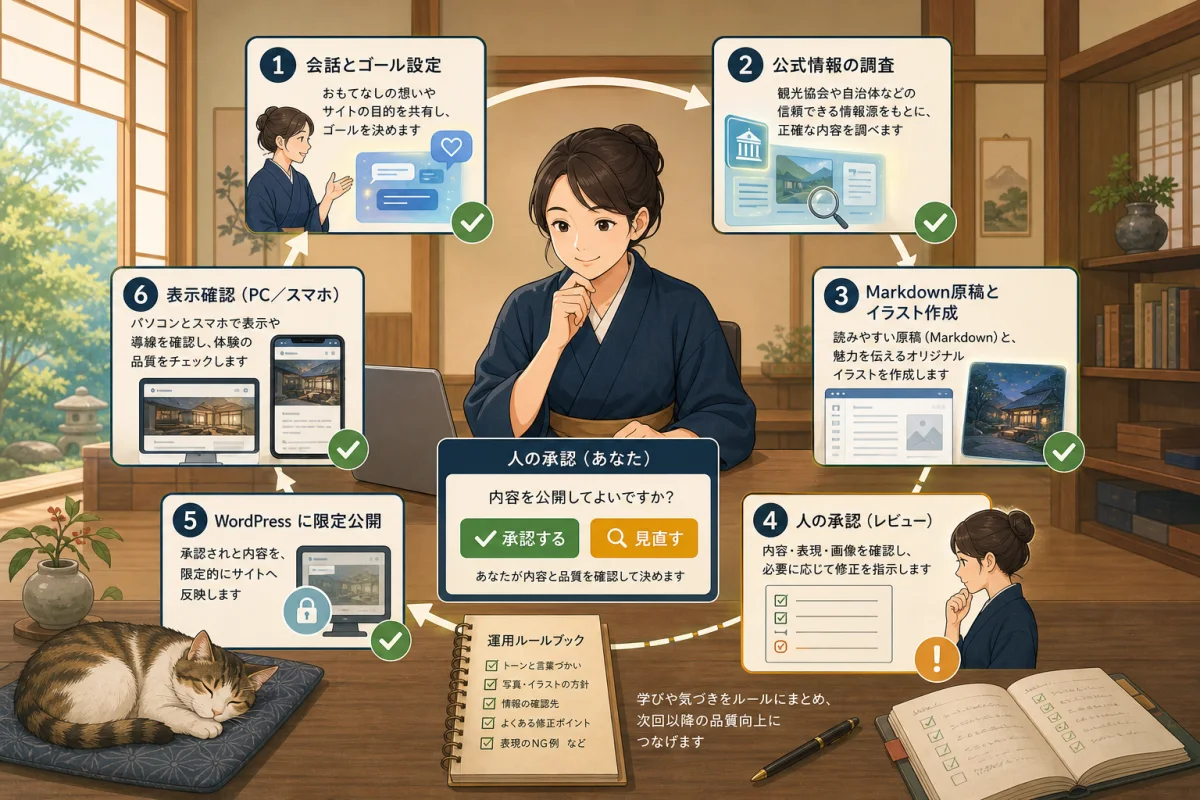
At Neko Yado Research, we divide our work into the following stages.
Host conveys purpose and conditions
↓
AI investigates existing articles, plans, and official information
↓
Create local Markdown manuscripts and images
↓
Check internal links, classification, and description
↓
Obtain and verify backup before production change
↓
Reflect by limiting the target with WP-CLI
↓
Reread post ID, poster, category, and image
↓
Check the public URL, text, links, and top page
↓
Leaving failures and learnings in operational rules
The important thing is not to combine article creation and production reflection into one operation. We do not make any changes during the investigation, we do not publish the manuscript immediately after it is completed, and we do not mark it as complete even after it is reflected in the production, just because the command was successful.
Example: Proceeding one article from consultation to publication
When adding an article for hosts on Neko Yado Research, we proceed as follows.
1. Narrow down your goals through conversation
Even if your initial request is just to “create an article,” the AI will review your existing content plans and published articles. Find out if there is an article you are planning to create next, if there is already an article with the same conclusion, or if there is a natural connection from the previous article.
If a similar article exists, it will be integrated into the existing article without adding another URL.If you increase the number of pages with the same content but with different search terms, it will be difficult for both readers and search engines to understand the differences.
2. Check variable facts with official information
WordPress, Codex, Claude Code, reservation services, payment, and Google functions will change. Don’t just write from AI’s memory, open the current official materials and check.
For articles related to cat health and behavior, we prioritize articles from veterinary associations, animal welfare organizations, and peer-reviewed articles. When introducing an inn, we check the inn’s official website, official SNS, local government/tourist association, etc., and do not write about experiences that we have not actually stayed at.
When investigating, we will leave the reference URL and confirmation date. However, do not rely solely on the short description displayed in the search results; read the main text of the original page.
3. Create a set of manuscript, images, and internal links
In addition to the title, record the slug, description, classification, confirmation date, location of the featured image, and alternative text in the manuscript.
Avoid using images in articles that look like documentary photos of real inns or cats. Do not repost photos of inns or cats without permission, and in the case of generated illustrations, use compositions that do not mislead people into thinking they are photos taken of actual scenes.
Internal links not only connect new articles to existing articles, but also create a path back to the new article from related existing articles and host information pages.
4. People check the disclosure range
Before publishing, we will confirm the following as human judgment.
- Matches the conclusion you want to convey to the reader
- I am not reporting my experience based on what I did not stay at.
- You may disclose information about your accommodation, cats, and people.
- Connection destination, internal path, user name, and secret value are not included.
- No guessing about booking conditions, prices, legal or health information
- Content does not overlap with related articles
The naturalness of the sentences is not the only condition for approval.
5. Limit targets and reflect in production
Perform a backup to ensure success and consistency before making changes. Only approved manuscripts, images, and necessary internal links will be published. Do not change themes, plugins, or server settings that are not related to the request at the same time.
If the backup fails, check the stop and continue conditions without assuming it was successful. Recovery risks are different between reversible article updates and data deletion/migration/server updates.
6. See the results your readers see
Reread the author, publication status, slug, category, description, and featured image from WordPress. After that, check the public URL, host information, related articles, and top page.
We also take pictures of the computer and smartphone screens and visually check to make sure that tables, images, headings, and reservation lines are intact. If the article is for the host, make sure that it can be read from the dedicated page as intended and is not mixed in with the latest news top page for the general public.
Don’t let WordPress be the only memory of the AI
WordPress is a place to publish to readers, but it is not a place to store all article plans, supporting materials, audit records, and operational rules.
| Information | Original example |
|---|---|
| Public article text and attributes | Markdown manuscript |
| Article themes and publication order | Content planning |
| Source of confirmation of accommodations and functions | Investigation record |
| Work rules followed by AI | AGENTS.md, CLAUDE.md |
| Public status on WordPress | Post ID and public page |
| Results after publication | Inspection/audit records |
If you leave important decisions only in conversations with the AI, you won’t be able to find them another day. Once you have decided on a conclusion, record it in the original book that suits your role.
Don’t put the original only on WordPress
The main text of the article is based on the Markdown file at hand. Title, slug, description, category classification, eye-catching location, confirmation date, etc. are also recorded on the manuscript.
---
title: "記事タイトル"
slug: "example-article"
description: "記事内容を説明する文章"
category: "宿主さん向け"
owner_section: "ai-site-management"
status: "publish"
fact_checked: "YYYY-MM-DD"
featured_image: "公開用画像の場所"
featured_image_alt: "画像の内容を説明する文章"
---
If you edit directly only on the WordPress management screen, it will be difficult to keep track of what has been changed, which manuscripts were the previous ones, and whether related pages have been modified. If you have the original copy on hand, AI can check not only the main text but also internal links and discrepancies with the article plan.
However, we do not include server configuration or authentication information in public Markdown. The internal operational rules used by the AI for its work and the samples distributed to readers are separated.
Case 1: I fixed the wrong file name on my own site.
Situation
The file that conveys the project’s operational rules to Codex was treated as the singular AGENT.md.In the process of creating the host template, we confirmed that the official file name is plural AGENTS.md.
Judgment
If you only correct the description in the distributed article and continue to use the old name in your own project, the method recommended to readers and the actual implementation will not match. I decided to unify the original to AGENTS.md.
Execution and confirmation
We did a full text search for descriptions, templates, scripts, and guides for Claude Code that referenced the old name within the project without changing just the file name. We have also confirmed that there are no original copies remaining.
Learning
If I find an error in the name or specifications, I will correct not only the published article, but also my own operations and reference sources. You can reduce omissions by asking the AI not only to “change the name,” but also to “look up references to the old name and suggest changes.”
Case 2: Changed ZIP distribution to Markdown direct link
Situation
Initially, templates AGENTS.md and CLAUDE.md were distributed in ZIP.However, it was pointed out that for the host who is not familiar with IT, ZIP files that cannot be checked until the contents are opened can be unsettling.
Judgment
Being able to technically distribute it and being able to use it with confidence for users are two different things. Changed to a direct Markdown link that allows you to read the content in your browser before downloading.
Execution and confirmation
We have confirmed that the new link not only opens, but can be retrieved directly as Markdown, and that no links to the old ZIP remain in articles or lists.
Learning
AI tends to use “I was able to place the file” and “I was able to open it via HTTP” as completion conditions. User concerns, file names when saving, and the existence of old conductors must be added to the completion conditions.
Case 3: Deleting environmental information from public samples that are too specific
Situation
In order to make the AI operation example easier to understand, the public template included information similar to the actual server system, internal configuration, and work commands.
Judgment
Specific examples help understanding, but internal information that should not be made public can provide clues for attacks and unauthorized access.“The more specific, the kinder” does not necessarily mean.
Execution and confirmation
Environment-specific descriptions have been removed and replaced with expressions that allow behavior to be reproduced without revealing the configuration, such as “Limit permissions,” “Take a backup that can be restored,” and “Human approval before publication.”I searched not only for templates, but also for articles and lists that explain them.
Learning
I will only disclose the judgment principles, confirmation items, and examples of hypothetical environments to readers. Connection destinations, internal paths, user names, secret values, and defense methods for actual operations will not be disclosed. We ask the AI not only to “delete secret values,” but also to “present configuration information that could lead to attacks as candidates.”
Case 4: Excluding new arrivals on the top page did not work at first
Situation
Added a process to exclude articles for the host from the regular new articles on the top page. The settings and code looked correct, but when checking the HTML of the public page, the article card was still there.
Judgment
You want to see the end result that your readers will see, not “just enable the feature and you’re done.”We investigated the possibility that the regular article list and the top page’s unique New Arrivals section are acquiring posts through different mechanisms.
Execution and confirmation
We checked how many target articles are displayed on the top page and added exclusion conditions to the target acquisition process. After making the correction, I confirmed the following two things:
- 0 article cards for the host
- Maintain the scheduled number of new articles on the top page
Learning
When confirming that the object is not displayed, it is not enough to confirm that the object has disappeared. Also check that the entire New Arrivals column has not been deleted. The settings screen, database, HTML, and actual screen are separate confirmation points.
Case 5: The article was published, but there were insufficient internal links.
Situation
When we increased the number of articles for the host, we found that even though the categories were set correctly, there were no related article links in the initial articles, and new articles were not posted on the hub page.
Judgment
Rather than relying solely on categories, we decided to create a route for readers using the following three layers.
- Enter “For the host” from the header menu
- Select purpose and category on the hub page
- Go to the previous/next/related article from the main article
Execution and confirmation
We made a list of the URLs and internal links of published articles, and confirmed their posting on the hub, round-trip links between articles, and category classification. I didn’t list all the articles in the header, but only put the entrance to the category where the article exists.
Learning
Include “entrance”, “related article”, and “return route” in the completion conditions for article publication. Even if you add a link only to a new article, if it cannot be reached from an existing article, it is one-way. Related existing articles will also be updated at the same time.
Case 6: When the backup failed, we did not mark it as successful.
Situation
During the backup before the production change, it was detected that the running file had been changed, and the new backup process did not complete normally.
Judgment
Executing the backup command and successfully obtaining a backup are two different things. I didn’t hide my failure and checked the following:
- Are there any incomplete files left in the process of creation?
- Is there a recent backup whose integrity has been checked?
- Can these changes be undone individually?
- Does it include data deletion, migration, or server updates?
Execution and confirmation
We have limited the scope to adding articles that can be made private or returned individually only if the conditions for continuing are met. Failed archives are no longer reported as “obtained” and constraints are clearly stated in the completion report.
Learning
When it comes to safe decisions in the event of an error, don’t make decisions based on your current mood. Write the following conditions in the operational rules: “Latest verified backup,” “Check for incomplete files,” “Only reversible changes,” and “Do not continue with deletion or migration.”
Don’t leave everything to one request.
In actual communication, requests are divided as follows.
Just a survey
Check the related manuscripts, article plans, and status on WordPress.
Please only read this time, and do not edit the file, change settings, or publish it.
Please report any missing information, duplication, internal link candidates, or facts that require confirmation.
Creating a local manuscript
Please create a Markdown manuscript using only confirmed information.
Please do not change the production WordPress.
Title, slug, description, classification, internal links, reference materials,
Please self-inspect whether there is any information that should not be made public.
Production reflection
Please reflect only one approved manuscript and related internal links to the production.
Please take a backup and confirm successful completion and consistency before making any changes.
Please do not change ineligible articles, themes, plugins, or server settings.
Verification after publication
Check the post ID, poster, status, slug, category, eye catch, and description.
Check the HTTP responses and links for published articles, hubs, related existing articles, and home pages.
Please report separately where it should be displayed and where it should not be displayed.
Do not mark unconfirmed items and failures as completed.
By dividing the requests, it will be easier to understand at what stage the recognition has deviated.
WP-CLI is not allowed to run freely
Neko Yado Research’s public article introduces hypothetical command examples to learn how it works. On the other hand, we do not disclose the connection method or execution route for actual operation.
The important ideas are the same.
- Only read at first
- Fixed target site, post ID, and number of posts
- Make draft creation and publishing separate operations
- Compare classification before and after change
- Import images one file at a time and check the attachment ID
- Only post IDs approved by people will be published.
- Remove, execute arbitrary code, and remove DB operations from the normal path
- Reread values from WordPress after execution
The idea of passing only permitted operations instead of the free WP-CLI is explained in How to create a restricted wrapper.
Items required for AI completion report
The host cannot judge the safety just by saying that it has been published. Let me report at least the following:
Work results
- Target: article name, slug, post ID
- Changes: manuscript, images, internal links, WordPress posts
- What hasn't changed: Excluded articles, settings, servers
- Backup: Successful completion, consistency, save time
- WordPress confirmation: Poster, status, category, image, description
- External confirmation: HTTP response for articles, lists, and top pages
- Display confirmation: Displayed locations, excluded locations
- Unconfirmed matters: person's screen confirmation, reservation form, etc.
- Error: Contents of occurrence, stage at which it stopped, basis for decision to continue
An AI operation that can report failures or unconfirmed matters is more reliable than one that declares “everything is fine.”
Turn failure into a rule for next time
To avoid repeating the same points in each conversation, once the decision is finalized, leave it in the appropriate original.
| Learning | Place to leave |
|---|---|
| Safety rules that AI always follows | AGENTS.md, CLAUDE.md |
| Article theme, publication order, classification | Content planning |
| Actual failures and judgments | Case notes |
| Article text, description, image information | Each Markdown manuscript |
| Confirmation results after publication | Operation records/audit records |
Instead of writing everything in one huge instruction manual, separate the original manual for each role. After adding a rule, you not only have the AI say “I’ll protect it from next time,” but also check to see if it is reflected in the actual file and can be referenced.
OpenAI’s official documentation explains how Codex reads AGENTS.md before starting work, and overlays instructions from the root of the project to the current work location. At Neko Yado Research, we use this mechanism not as a “request to AI” but as an operational rule to check the publication range, backup, article quality, and suspension conditions every time.
An example of how a conversation became a rule
The following decisions, made through actual conversations, were reflected in operations rather than just on the spot.
- Official name for Codex is
AGENTS.md - Make the distributed file a direct Markdown link that allows you to see the contents
- Remove environment-specific information from public samples
- Exclude articles for hosts from new arrivals for general public.
- Instead of arranging all articles in the header, you can follow them from the classification page
- When a new article is published, link back to related existing articles.
- Instead of treating backup failures as successes, determine the scope of continuation based on the reversibility of changes.
- Priority is given to the cat’s welfare and current information regarding resident cat enrollment and rest.
By accumulating detailed points, it will be easier to avoid the same mistakes in the next article from the beginning. This is the value of AI operations that go beyond simply generating sentences.
If the host starts small
There is no need to hand over the operation of the production server to AI from the beginning.
- Open the practice folder in Introduction to VS Code
- Read one existing article and give only suggestions for improvement.
- Create a new manuscript in Markdown
- People register drafts on WordPress from the admin screen
- Once you get used to it, proceed to Introduction to WP-CLI without changes
- Try registering one draft in a test environment
- Consider production after restricting execution paths and privileges
Using AI and allowing server manipulation are two different things. Textual consultation alone is helpful.
Summary
Neko Yado Research’s AI/WP-CLI operation is not a system where AI automatically manages the site. In this operation, the host decides the purpose and scope of disclosure, AI assists with research, drafting, limiting work, and confirmation, and humans judge the results.
In reality, there were oversights in file names, distribution methods, public information, top display, internal links, and backups. The important thing is not to pretend that failures do not occur, but to detect failures, stop them, isolate the cause, and change the rules for next time.
If you want to start from the basics, please see WP-CLI Basics, for the series of publishing steps, please see From backup to article publication/display confirmation, and for safety rules with AI, please see Before managing WordPress with Codex/Claude Code.
For a detailed line-up of each task, see Failures that occurred in AI operation and tasks that should not be left to the task, where you can see the division into tasks that require assistance, tasks that are approved by humans, and tasks that cannot be left to AI alone.
Reference materials
- WordPress Developer Resources: WP-CLI command list
- OpenAI: Codex instruction settings using AGENTS.md
- Anthropic: Claude Code’s memory and CLAUDE.md
Note: This article is an example of sharing the process of judgment. There is no guarantee that the same procedure will work securely on all servers. Prioritize the procedures of your contractor, production company, and administrator.