When you run WordPress on a VPS, you can configure it more freely than on a rental server. However, not all server companies update and protect them.
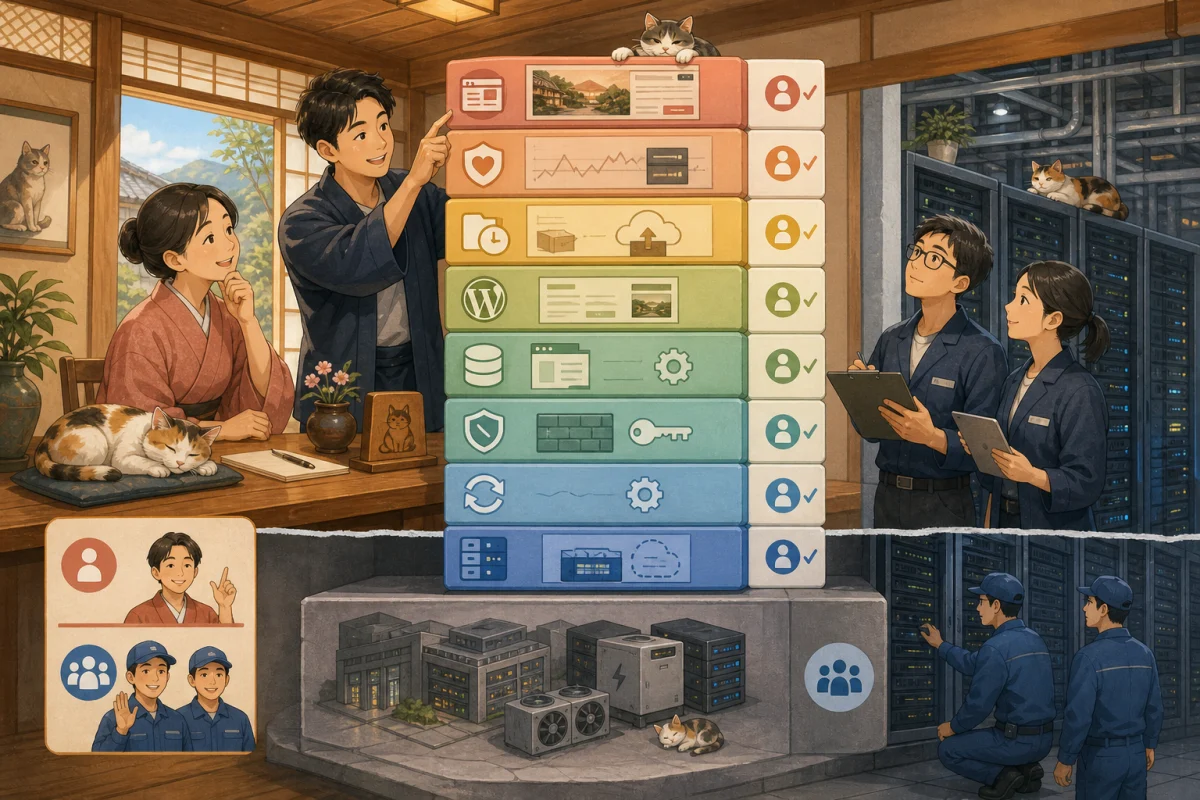
VPS operators protect data centers, physical equipment, virtualization infrastructure, etc. The OS, web server, PHP, database, WordPress, firewall, backup, etc. installed in the VPS are the responsibility of the user, depending on the contract details.
The point is not that the host can do everything.
It is necessary to determine who will be in charge of each task, who to contact in the event of an abnormality, and what will be handed over at the end of the contract.
- Distinguish whether it is a VPS or not
- Responsibility is divided by layer
- OS update
- SSH and administrator privileges
- Firewalls and exposed ports
- Web server, PHP, database
- TLS certificates and domains
- Backups and snapshots
- Target to monitor
- Separate contact information in case of failure
- Things to check in the outsourcing contract
- Management ledger owned by the host
- Conditions where VPS is not suitable
- Prompt for AI to investigate scope of responsibility
- Summary
- Reference materials
Distinguish whether it is a VPS or not
If the following apply to you, you may be using a VPS/virtual machine.
- Choose an OS such as Ubuntu, Debian, or AlmaLinux
- Some users use root or sudo
- Connect to the server with SSH key
- I or my production company configured nginx, Apache, PHP, and MySQL.
- There is a screen to set firewall and ports
- Manage OS restarts, snapshots, and disk space
If the production company has set everything up, you may not even know that the host is using a VPS. Check your invoice, contract email, and management screen, and if you don’t understand, ask about the server system, OS, and administrator.
The differences between the methods are explained in Differences between rental servers and VPS.
Responsibility is divided by layer
This shows the division of responsibility for a general VPS.In fact, prioritize service and maintenance contracts.
| Layer | VPS operator | Inn/management side |
|---|---|---|
| Data center/physical equipment | Mainly management | Check contract/failure information |
| Virtualization infrastructure | Mainly management | Select usage plan |
| Virtual network | Provide functionality | Set connection rules |
| Guest OS | Image may be provided | Update, configuration, reboot |
| SSH/Administrator Credentials | Provides connection functionality | Manages keys, users, and permissions |
| Firewall | Provides functionality | Allows only necessary communications |
| nginx/Apache | Installation, updates, settings | |
| PHP/Database | Introduction, Update, Protection | |
| TLS certificate | Functions may be provided | Issuance, renewal, expiration monitoring |
| WordPress | Main unit, theme, and plugin updates | |
| Backup | Snapshot function, etc. | Target, frequency, separate save, restore test |
| Monitoring and troubleshooting | Monitor infrastructure | Monitor web, capacity, certificates, and apps |
| Article/reservation guideline | Check content and sales operations |
AWS’s EC2 security documentation also explains the shared responsibility of customers to manage guest OS and deployment software updates, connection credentials, and network access, while the physical infrastructure is protected by the operator.
OS update
Even if “Updated” is displayed on the WordPress management screen, it does not necessarily mean that the OS is up to date. The OS manages:
- Security update
- Package update
- Support deadline
- Reboot after kernel update
- Update failure log
- Reliability of additional repositories
Ubuntu Server official documentation explains how to automatically apply security updates. However, an administrator is required to check automatic update settings, targets, logs, and whether a restart is required. External repositories are not necessarily automatically updated.
Questions to ask
- What is the OS type and version?
- When will support end?
- Are security updates automatic or manual?
- Who will receive the failure notification?
- If a reboot is required, who will do it and when?
- Who will check WordPress and booking lines after reboot?
SSH and administrator privileges
SSH is the gateway to remotely manage your VPS.If it is leaked, it may be manipulated by a wider range of people than WordPress administrators.
- Avoid direct root login
- Use SSH keys with different users for different people
- Do not share passwords via chat or email
- Limit sudo to only those who need it
- Delete the key when retiring or contract ends
- Consider connection source restrictions and multi-factor authentication
- Check the logs to see who connected and when
With “one common account for production companies”, it is not possible to track who is performing the operations. When allowing connection to an AI, the human root key is not handed over as is, but permissions such as reading, updating, and publishing are divided.
Firewalls and exposed ports
VPS allows only necessary communications. In general, HTTP/HTTPS is used for web publishing, and SSH is used for management, but don’t just copy the numbers without checking the environment.
Ubuntu official security guide also recommends secure remote connections using least privileges, firewalls, and SSH.
Things to check are:
- Which services are made public?
- Is the database exposed directly to the Internet?
- Who uses SSH and from where?
- Are there two firewalls, one on the cloud side and one on the OS side?
- Are the rules before the change recorded?
Let’s first check how to use the recovery console, as you will not be able to connect yourself due to an incorrect change.
Web server, PHP, database
Under WordPress, nginx or Apache, PHP, MySQL or MariaDB are running.
Administrators know:
- Installation method and configuration file
- Current version
- Security update
- Compatibility with WordPress
- Automatic startup and restart method
- Error log location
- Disk space and database capacity
- Backup and restore
Do not make major changes to WordPress, PHP, database, and OS on the same day, as updating one layer will affect other layers.
The role of each software is explained in detail in Roles of Docker, nginx, PHP, and MySQL, following the flow of page display.
TLS certificates and domains
When your HTTPS certificate expires, a warning will appear in your browser, discouraging you from making a reservation.
- How to issue a certificate
- Automatic update settings
- Update failure notification
- External monitoring of expiration dates
- Company and account that manage DNS
- Automatic domain renewal and payment Record
.Even if automatic certificate renewal is set up, if no one sees the failure notification, it will not prevent the certificate from expiring.
Backups and snapshots
VPS snapshots alone may not meet all recovery requirements.
- WordPress files
- Database
- Web server/PHP/OS settings
- TLS settings
- Automatic execution settings
- Docker configuration and environment settings
- Monitoring settings See how far you can move
back.
Ubuntu Backup Materials guides you through planning, including what to save, how often, where to save it, how to restore it, and storage in another location.
For specific WordPress backups, please see Backup and restore before WordPress update.
Target to monitor
Even if the server is running, WordPress or the reservation form may be broken.
Foundation
- CPU, memory, disk space
- Server life and death
- OS update failure
- Backup failure
- Suspicious login
Website
- HTTPS returns 200
- Certificate expiration date
- Display top and important pages
- Reservation button link destination
- Sending inquiries and receiving emails
- PHP/Database error
Instead of only sending notifications to one person, decide who will be your representative in your absence.
Separate contact information in case of failure
| Symptoms | Initial contact suggestions |
|---|---|
| VPS itself does not start | VPS operator/server administrator |
| Unable to connect via SSH | Server administrator |
| WordPress only white screen | WordPress maintenance staff |
| Database connection error | Server/DB administrator |
| Reservation service only suspended | Reservation service provider |
| Domain expired | Domain contract administrator |
| HTTPS Warning | Server/Certificate Administrator |
The host is not required to determine the technical cause. Be able to communicate the URL, time of occurrence, screen, and last-minute changes.
Things to check in the outsourcing contract
If you entrust VPS management to a production company, we will confirm the following in writing.
- Update frequency of OS and each software
- Emergency vulnerability response time
- Monitored targets and reception hours
- Backup targets, retention, and restore tests
- Fees and range of failure support
- SSH key/administrator account management
- Domain/VPS contract name
- Delivery of configuration files and procedure manuals
- Data migration at the end of the contract
- Handling of subcontractors and personal information
“Server maintenance set” alone does not indicate the scope.
Management ledger owned by the host
It records not the confidential information itself, but its location and responsibilities.
| Item | Contract partner/method | Main person in charge | Substitute | Renewal/deadline | Emergency contact information |
|---|---|---|---|---|---|
| VPS | |||||
| OS | |||||
| Domain/DNS | |||||
| TLS certificate | |||||
| WordPress | |||||
| Backup | |||||
| Monitoring |
Do not write your password or private key in this table, use a business password management method.
Conditions where VPS is not suitable
- There is no one in charge of updating the OS
- Unable to respond even after receiving a failure notification
- There is no one in charge of restoring backups.
- I receive nothing at the end of the contract with the production company.
- Only those who pay the server fee know the contract information
- Thinks that “AI will manage everything, so there is no need for humans”
In this situation, moving to managed WordPress or a rental server may lower the total cost and risk of accidents.
Prompt for AI to investigate scope of responsibility
Please sort out the scope of responsibility for the VPS that runs the inn's WordPress.
Do not change settings, update, restart, or test connectivity yet.

From the readable information and contract documents, please tabulate the following:
- Range managed by VPS operator
- Range managed by the inn/production company
- OS, SSH, firewall, web server, PHP, DB, TLS
- WordPress, backup, monitoring, failure response
- Main person in charge, alternate person in charge, last confirmation date
- Unknown points and questions to business operators and production companies

Do not display private keys, passwords, personal information, or environment variable values.
Don't guess who is responsible; mark it as "unconfirmed."
AI can help take inventory of the configuration and create confirmation sheets, but it cannot take responsibility in the event of a failure. Specify the person and the contractor.
Summary
- VPS operators mainly manage physical and virtual infrastructure
- OS, SSH, firewall, and installed software are likely to be the responsibility of the user.
- Automatic updates also require someone to be in charge of logging, restarting, and checking operation.
- Try restoring WordPress and DB in addition to snapshots
- Monitor server operation and web/reservation operations separately
- When entrusted, clearly state update, monitoring, restoration, emergency response, and handover.
- The host has a ledger of contractors and responsible persons, not confidential information.
If the person in charge cannot explain the purpose of continuing to use VPS, please reconsider keeping the configuration complicated.
Reference materials
- AWS: EC2 Security and Shared Responsibility
- Ubuntu Server: Security suggestions
- Ubuntu Server: Automatic updates
- Ubuntu Server: Backup
Note: Responsibility, support, snapshots, and monitoring vary depending on the provider and contract details. Be sure to check your contract and official documents.